In Synthesizer V Studio 2 Pro, many new features have been added compared to previous versions, and some specifications have also been changed.
¶ Introduction of the Account System
Version 2 introduces a new license management system that uses user accounts.
This eliminates the need to activate each voice individually when using them on a new PC and allows you to download multiple voices at once.
Once a product is registered to your account, logging into the editor will authenticate all of your owned Synthesizer V Studio 2 Pro products.
For more information, please see "Account and Products Management" and "Editor Installation and Activation".
¶ Massive Optimizations
Thanks to improved algorithm design and enhanced multi-threading support, Synthesizer V Studio 2 Pro renders up to 300% faster than its predecessor. This significant speed boost is achieved without requiring a dedicated GPU or acceleration hardware, allowing for seamless offline use.
¶ Changes to Note Group Functionality
In Version 1, notes and parameter control points could be placed directly on tracks, and selected notes and control points could be grouped arbitrarily.
In Version 2, the workflow has been changed to first placing note groups on tracks, then entering notes within them.
This change makes projects easier to organize and standardizes the operation between standalone and plugin versions.
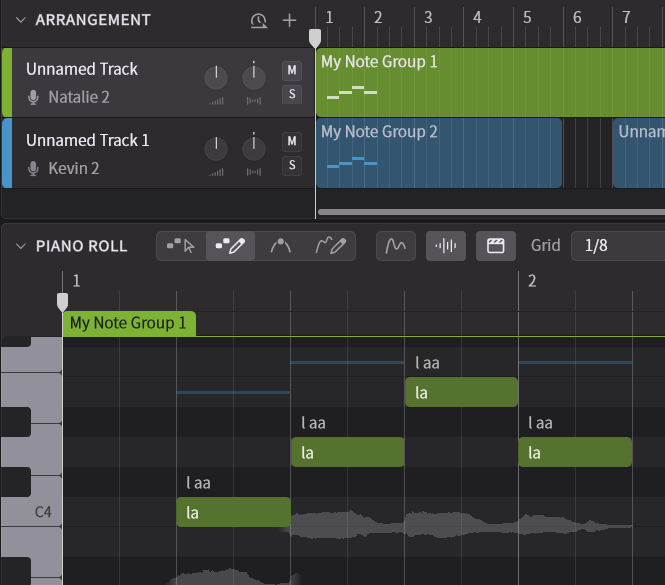
Here are the changes made to note group specifications in Version 2:
- All notes and control points belong to a note group.
- Creating a note on a new track without a note group will automatically create a note group.
- Double-clicking in the track area creates a new group. Additionally, the track area allows for splitting, merging, and duplicating groups.
- Vocal Modes and Parameters settable in the Voice Panel can now be configured per note group instead of per track.
For further specifications and usage, please refer to "Note Groups".
¶ Using Groups with Vocal Modes
Using note groups allows you to divide an entire track into several blocks and set different Vocal Modes for each.
This enables easy switching of Vocal Modes within a single song without needing to perform detailed operations in the Parameter Panel.
¶ Parameters and Vocal Modes
In Version 2, the effects of Vocal Modes have been enhanced. Moreover, they now influence not only timbre but also pronunciation nuances and pitch curves.
By decoupling these elements, users can craft significantly more realistic, emotionally expressive vocals that perfectly suit the tone and style of their music.
Therefore, using Vocal Modes tends to result in more natural and ideal sounds compared to adjusting Parameters such as tension or breath.
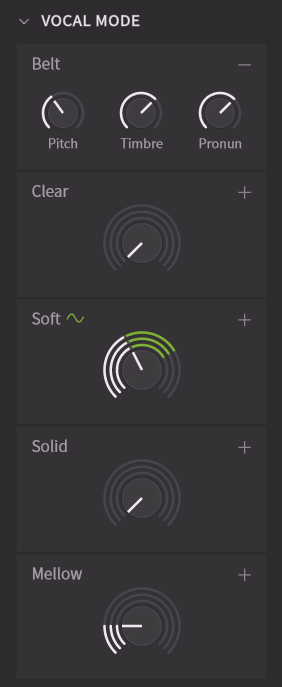
For more details, please refer to the Vocal Modes and Base Parameters pages.
¶ Changes to the AI Retakes Function
In Version 2, the AI Retakes function has been integrated into the Notes Panel.
Previously, only pitch and timbre could be retaken. In Version 2, four buttons are available: [Pitch] [Timing] [Timbre] [All]. Retaking "All" in particular can produce more noticeable changes compared to Version 1.
Furthermore, since the default take tends to produce a stable vocal sound, several retakes can increase the likelihood of generating a dynamic and natural take.
The [Expressiveness] and [Enhancement] features from Version 1 have been redesigned and replaced with the [Expression Pad] function, which allows for specifying pitch and timbre nuances.
Expression Pad can be applied to notes even when not using AI Retakes.
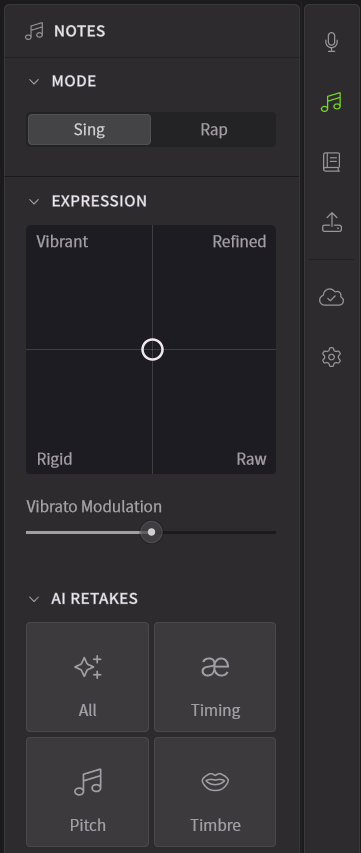
For details on AI Retakes and Expression Pad, please refer to "Notes Panel".
¶ Pitch Editing Function Revamp
In Version 2, the pitch editing method has been revamped. Using Smart Pitch Controls and the Expression Pad in the Notes Panel allows for easy and precise editing of pitch curves.
In addition, various elements such as AI Retakes and Vocal Modes influence the pitch curve.
For more details, please see “Pitch”.
¶ Smart Pitch Controls
Smart Pitch Controls is a groundbreaking system that allows for the coexistence of AI-generated pitch curves and user input. Drawing control points or short curves on the piano roll results in the real-time generation of a pitch curve reflecting those inputs.
This allows for the recreation of highly realistic pitch curves with minimal effort, while also enabling the drawing of detailed curves.
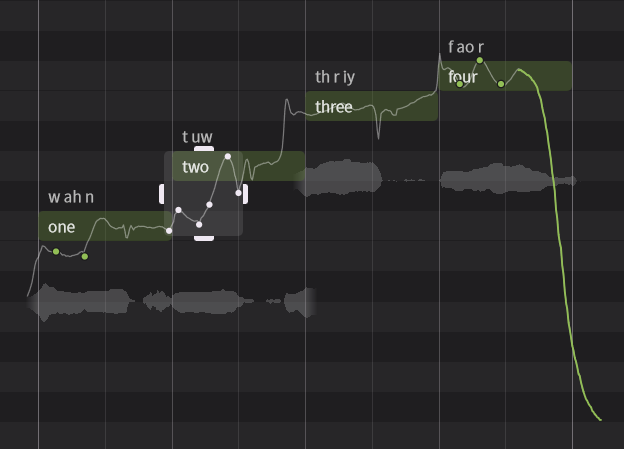
For instructions on how to use Smart Pitch Controls, please refer to "Piano Roll".
¶ Removing and Rebirthing Manual Mode
Manual Mode has been discontinued in Version 2. However, the following functions are available instead:
¶ Vibrato Editing
While vibrato was specified by numerical values in Manual Mode, version 2 allows for intuitive editing of vibrato depth and frequency using the Smart Pitch Controls.
¶ Keeping the pitch curve fixed
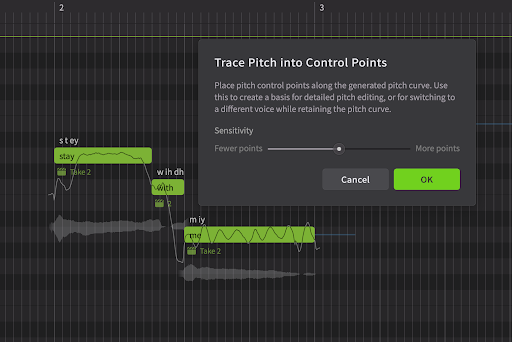
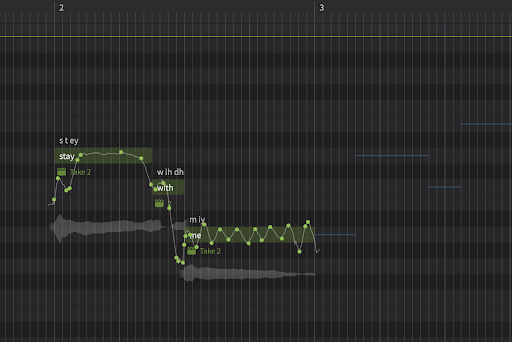
Sometimes it’s desirable to prevent the pitch curve from being affected by further re-renders. For example, if you might want to trace the pitch generated based on one voice, and reuse the same pitch after switching to another voice.
In Synthesizer V Studio 2 Pro, simply select the notes, go to the Modify menu and choose ‘Trace Pitch into Control Points’. This will automatically create control points along the generated pitch curve, ensuring the shape remains mostly intact, while preserving enough flexibility for meaningful edits.
| Before | After |
|---|---|
 |
 |
¶ Creating unique or robotic pitch stylizations
Another use of the Manual Mode in version 1 was for completely bypassing the pitch generation algorithm by using manually specified parameters, even hand-drawn curves to create either robot-sounding or personalized pitch stylizations.
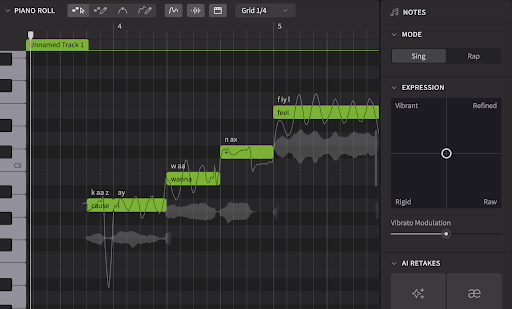
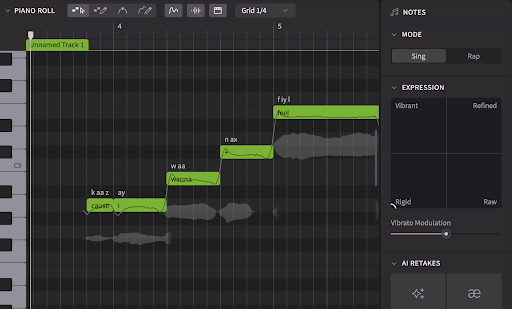
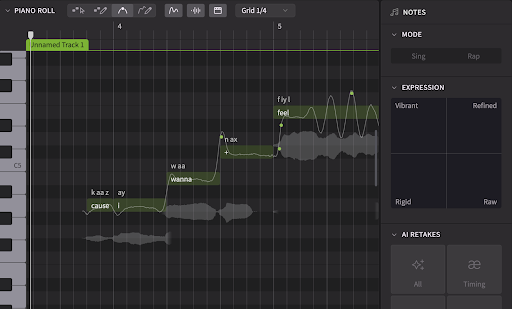
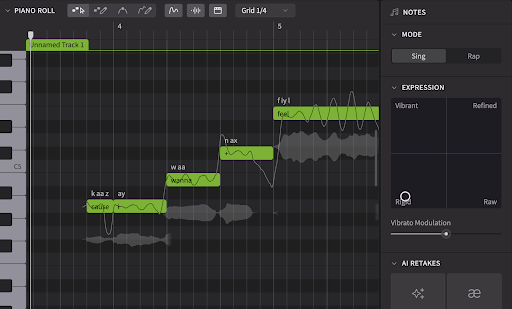
Although pitch curves are automatically generated in Version 2, a "Rigid" mode is also included that offers behavior similar to the previous Manual Mode.
To use this mode, select the desired note and move the pointer in the [Expression Pad] to "Rigid" at the bottom left.
In this mode, the pitch curve is flattened and only a small fluctuation occurs near note boundaries.
| Default | Rigid |
|---|---|
 |
 |
Furthermore, pitch control points under Rigid mode will have a similar effect to the pitch curve like the Manual Mode sliders in version 1. They will create vibratos with a stable rate of oscillation, clearly defined note transitions, and precisely controlled pitch offshootings.
It’s even possible to interpolate between the Manual Mode-like behavior under ‘Rigid’ mode with the more natural dynamics from other modes:
Please note that "Rigid" mode can only be used with voices for Version 2.
For the compatible voices of Version 1 used in the Version 2 editor, a "Stable" mode has been implemented instead, which tends to generate relatively flat pitch curves.
For details on the Expression Pad, please refer to "Notes Panel".
¶ Phoneme Timing Panel
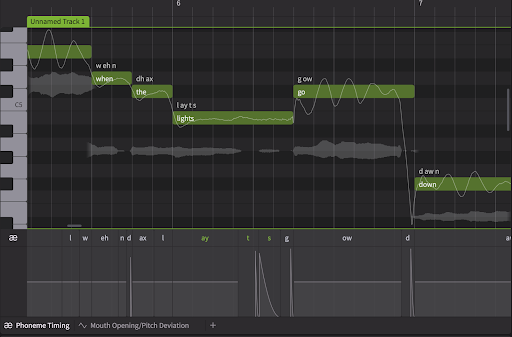
In Version 1, adjusting the length of phonemes required specifying a relative scaling factor using sliders in the Note Properties Panel.
The new "Phoneme Timing Panel" feature in Version 2 allows for intuitive manipulation of phoneme timing and pronunciation strength.
Furthermore, the timing and intensity of the onset of plosive sounds can be edited in more detail for certain consonants.
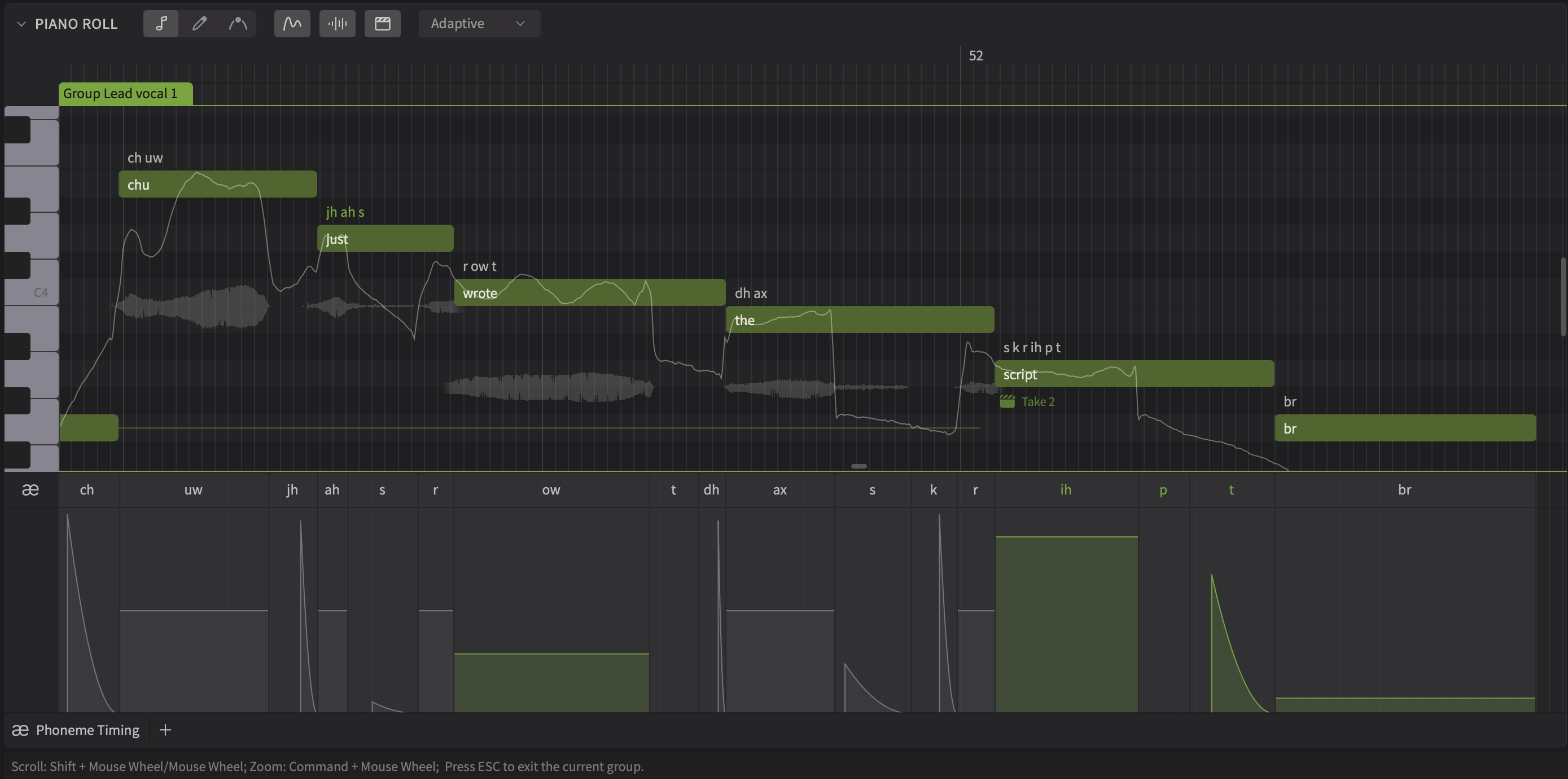
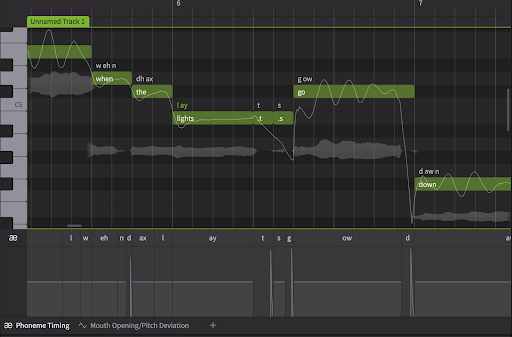
In Version 1, some users would split notes and input a single phoneme to accurately specify its timing.
However, the new model generates phoneme timing that takes musical context into greater consideration than before. Therefore, adjustment methods such as splitting notes and fixing phoneme length will no longer be recommended.
| Not Recommended | Recommended |
|---|---|
 |
 |
¶ Mouth Opening Parameter
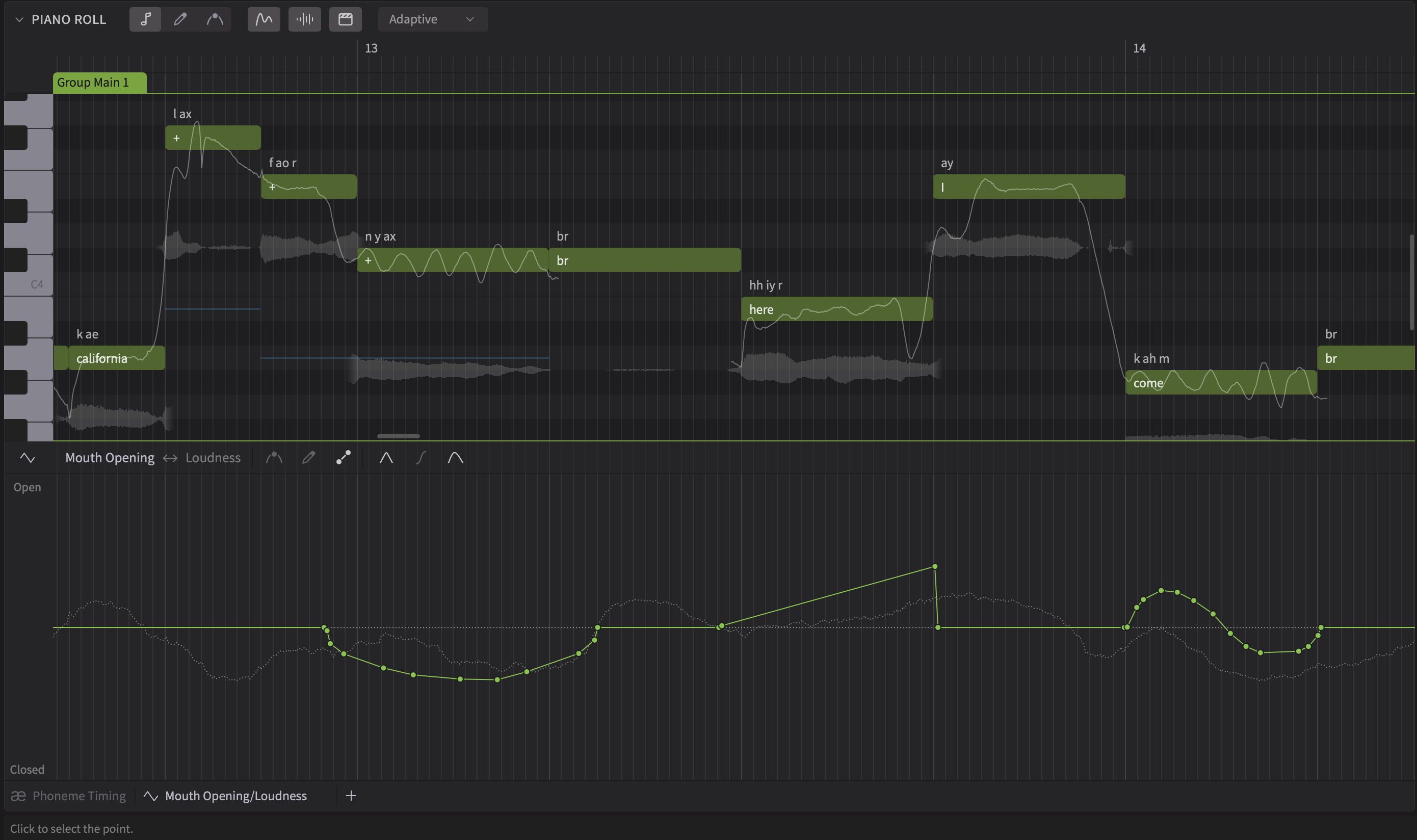
A new parameter, the first of its kind, has been added to upgraded voices: Mouth Opening, which fundamentally alters vowel pronunciation. This intuitive control allows users to accentuate specific words, or subtly modify the way a phrase begins or ends, adding depth and expressiveness to their synthesized vocals.
¶ Korean Support
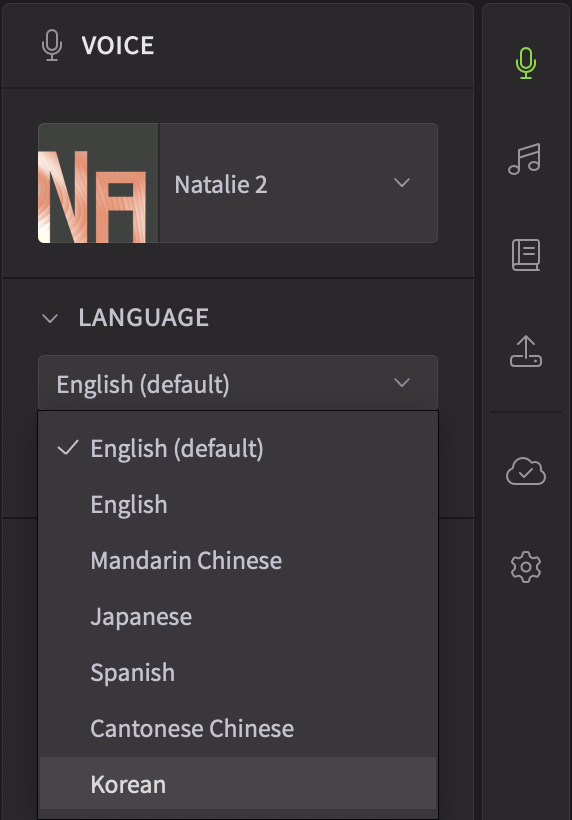
Synthesizer V Studio 2 Pro introduces support for Korean as a new voice synthesis language. Additionally, Korean will be available as a cross-lingual synthesis language option for all upgraded voices.
¶ Importing Projects Created in Version 1
When importing projects created in the version 1 editor into Synthesizer V Studio 2 Pro, and when switching from a version 1 voice to a version 2 voice, please pay attention to the following.
¶ Resetting the AI Retakes
Version 1 voices, including their compatibility updates for Synthesizer V Studio 2 Pro, will have different results from AI Retakes compared to version 2 voices, even for the same take number. A take that worked well for version 1 may not sound ideal in version 2.
We recommend resetting the takes after importing a version 1 project and switching to a version 2 voice.
¶ Re-adjusting the Vocal Modes
Version 2 voices tend to have more distinct Vocal Modes. This however, means that the same combination of Vocal Modes that worked for version 1, may become too strong for version 2.
In addition, if you have tried using standard parameters such as ‘Breathiness’ and ‘Tension’ to make-up for what Vocal Modes were perhaps lacking, you may find that version 2 works better with a different balance between Vocal Modes and these parameters, or in some cases completely switching off the standard parameters.
¶ Watching Out for Pitch Deviation Parameters
Pitch Deviation was extensively used in version 1 as a general solution to bridge the gap (literally) between pitch generated by the system and what the user has drawn. This however, may not work in version 2 since the system could generate a completely different pitch curve to start with.
¶ Converting a project created with Version 1
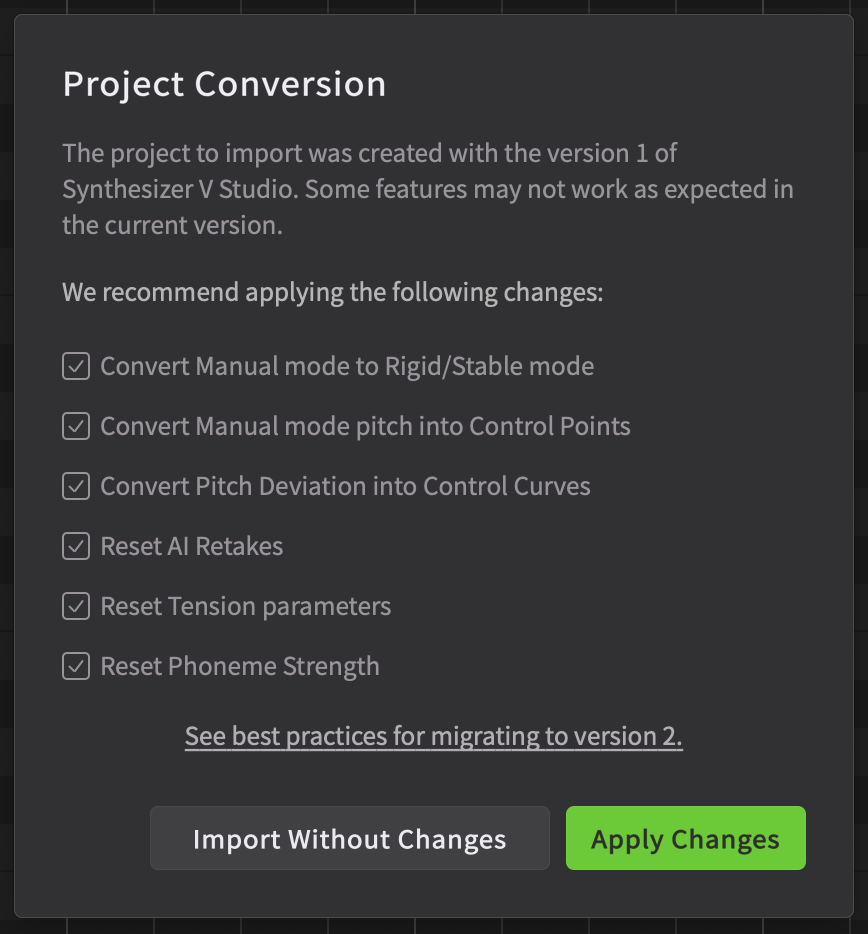
When a project created in version 1 is imported into version 2, a conversion dialog appears to optimize various parameters for version 2.
¶ Discontinuation of Free Version and Release of Trial Function
Distribution of the free version of the editor, known as the Basic edition, and the free Lite edition voices has been discontinued.
Instead, a 14-day trial for the editor and a 7-day trial for voices are now available.
(Note that some third-party voices may not support trial functionality.)
To start a trial, first create a Dreamtonics Account and click the trial button for each product.