Using the Voice-to-MIDI Conversion feature, you can extract pitch and lyrics from audio and convert them into notes.
The audio must be a solo vocal without any accompanying instruments.
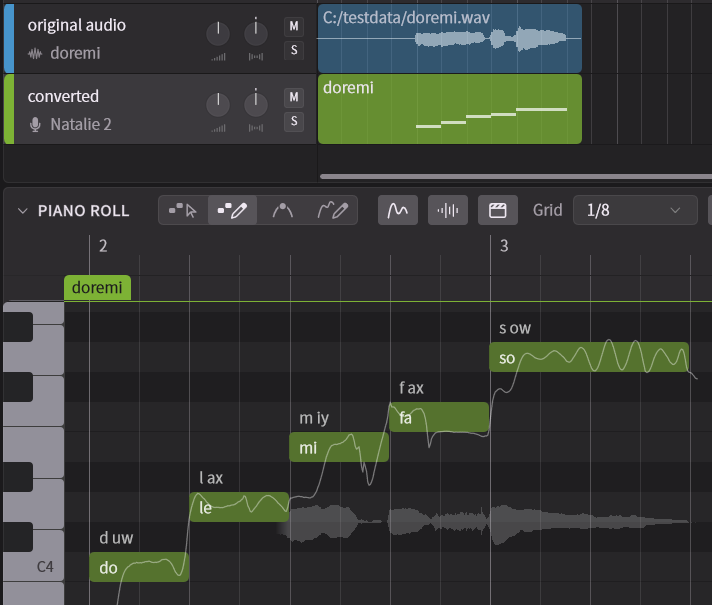
¶ 1. Import an Audio File
Import the audio, that will create an Instrumental track.
With Full ARA Mode on the ARA plugin, you can load audio clips directly from your DAW without importing the audio.
For details, please refer to "Full ARA Mode Setup".
¶ 2. Select the Destination Track
Select the track to insert the converted note groups into.
Make sure there are no note groups in the area you want to convert so they don't overlap with the converted note group.
¶ 3. Voice-to-MIDI Conversion
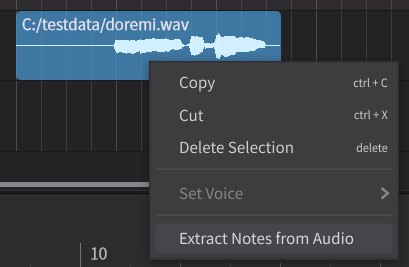
Right-click on the audio and select Extract Notes from Audio.
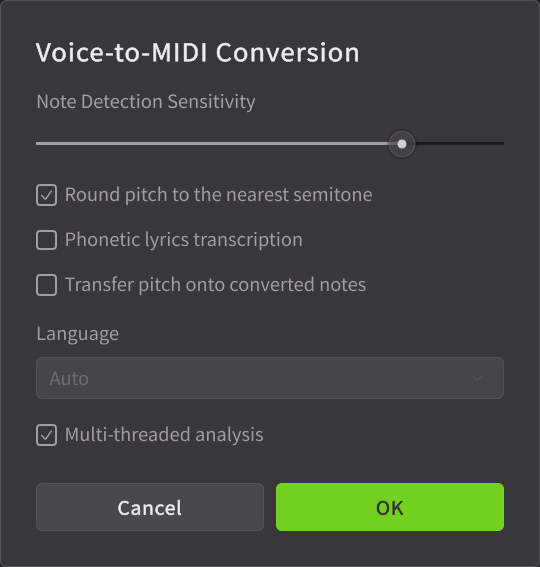
The following items can be set:
- Note Detection Sensitivity: Lowering the sensitivity detects only the loudest sounds, while raising it detects the quietest sounds and converts them to notes. It also changes the fineness of pronunciation detection. For example, increasing sensitivity may result in more accurate detection on fast tempo songs.
- Round pitch to the nearest semitone: When on, notes are placed in semitone units. When off, notes are placed in 25-cent units of microtones.
- Phonetic lyrics transcription: If checked, the lyrics of the audio are analyzed and reflected in the notes.
- Transfer pitch onto converted notes: When checked, the audio's pitch is reflected in the control points of the Smart Pitch Control.
- Language: When [Phonetic lyrics transcription] is on, select the language of the lyrics. Choosing "Auto" will automatically detect the language of the lyrics.
- Multi-threaded analysis: Use multi-threading to increase the speed of analysis.
Clicking [OK] will start the conversion process.
Lyrics detection is only supported for English, Japanese, and Chinese.
[Transfer pitch onto converted notes] is a feature that uses Smart Pitch Control, but the Version 1 voices does not support control points for Smart Pitch Control.