Even if you uninstall Synthesizer V Studio 2 Pro, some related files may remain.
If a software problem occurs and reinstallation is necessary, please delete the following related files completely:
¶ 1. Uninstall the Editor
If you are using an offline license, please deactivate it in the license panel within the editor.

¶ Uninstallation on Windows
- Open the [Settings] application from the Start menu.
- Confirm that Synthesizer V Studio 2 Pro is listed in the [Apps] > [Installed apps] list.
From the three-dot menu [...], select Uninstall.
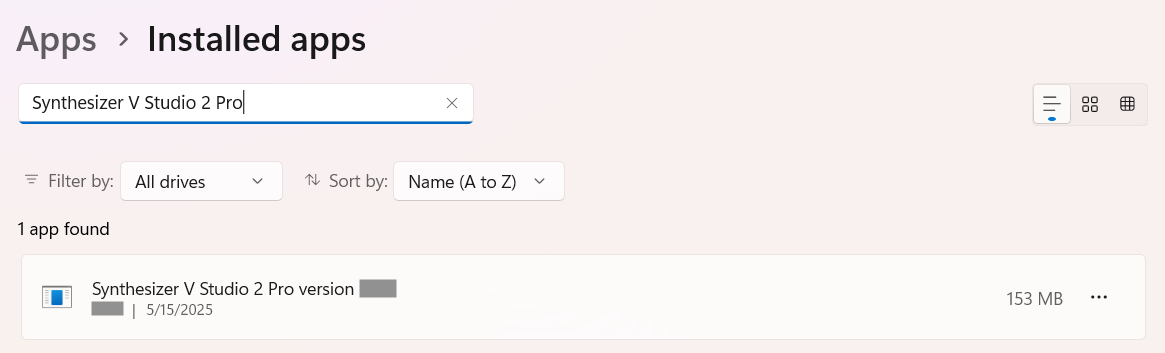
¶ Uninstall on Mac
- Select [Go] > [Applications] from the menu bar in Finder. (Or press Shift+Command+A)
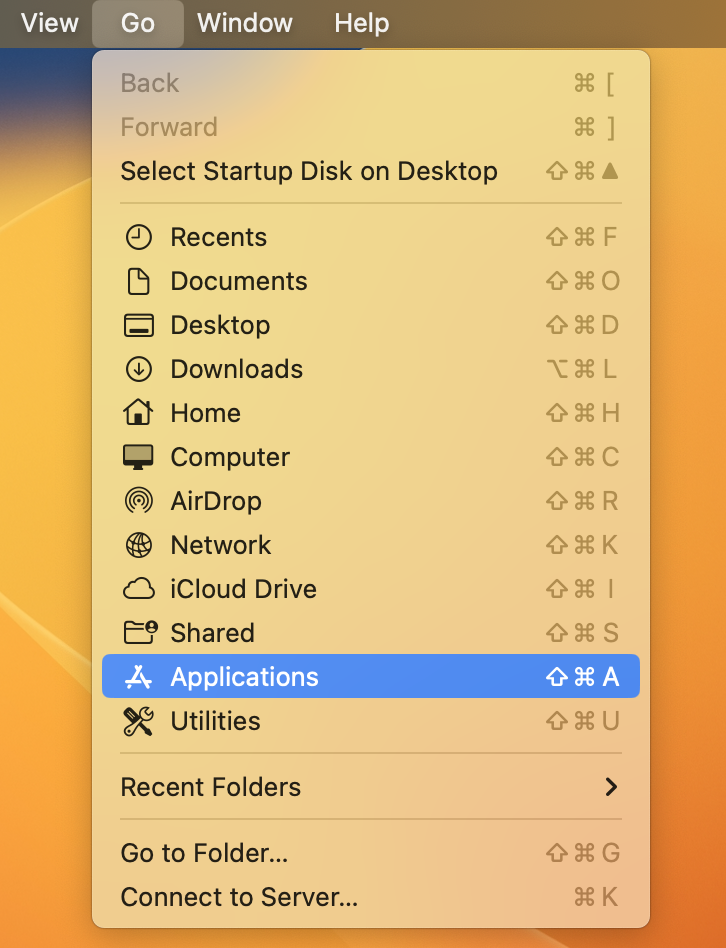
- Delete the
Synthesizer V Studio 2 Pro.appfile.
¶ 2. Delete Related Files
¶ Delete System Folders
Delete the following folders and their contents:
System folders contain settings, pronunciation dictionaries, scripts, and other data. Please back up these folders if needed.
For this task, please ensure that your system is set to show hidden files.
- On Windows, check [View] > [Show/Hide] > [Hidden items] in File Explorer.
- On macOS, press Command+Shift+. in Finder.
¶ Windows
C:\ProgramData\Dreamtonics\Synthesizer V Studio 2C:\Users\<username>\AppData\Roaming\Dreamtonics\Synthesizer V Studio 2
¶ macOS
/Library/Application Support/Dreamtonics/Synthesizer V Studio 2/Users/<username>/Library/Application Support/Dreamtonics/Synthesizer V Studio 2
¶ Delete Plugins
Delete any Synthesizer V Studio 2 Pro plugins found in the following folders:
¶ Windows
- VST3 (VSTi) Plugins:
C:\Program Files\Common Files\VST3 - VST3 (ARA) Plugins:
C:\Program Files\Common Files\VST3,C:\Program Files\Common Files\ARA - AAX Plugins:
C:\Program Files\Common Files\Avid\Audio\Plug-Ins
¶ macOS
- VST3 (VSTi) Plugins:
/Library/Audio/Plug-Ins/VST3 - VST3 (ARA) Plugins:
/Library/Audio/Plug-Ins/VST3,/Library/Audio/Plug-Ins/ARA - Audio Unit Plugins:
/Library/Audio/Plug-Ins/Components - AAX Plugins:
/Library/Application Support/Avid/Audio/Plug-Ins